A cloud infrastructure grant from Tencent Cloud International, supporting latency-sensitive quantitative trading and agent workloads on low-latency APAC nodes interconnected over Tencent's private backbone.
What the infrastructure provides
Low-latency APAC nodes: high-availability regions in Hong Kong and Singapore, physically close to major exchanges
CCN private-backbone interconnect: Cloud Connect Network links regions over a private backbone rather than the public internet, keeping cross-region latency stable and free of public-BGP jitter
Financial-grade compliance: SOC 2 Type II, ISO 27001 and PCI DSS, plus regional certifications (Hong Kong ICAR, Singapore MTCS)
How I plan to use it
Latency and jitter benchmarking of a trading loop across APAC regions, measured against a public-internet baseline
Backtesting and agent-rollout runs that extend the Quant Trading Agent built at AQUMON — LangChain orchestration over Futu OpenAPI real-time data and automated execution
Serving experiments for agentic post-training workloads where decision latency, not throughput, is the binding constraint
Grant support
Program
Tencent Cloud Quant Infrastructure Grant
Support
USD 1,000 cloud credits
Provider
Tencent Cloud International
Focus
Low-latency quantitative trading and agent workloads across APAC
OfficeBuddy: Vision-in-the-Loop Open-Source Office Agent (53★ on GitHub)
An open-source project on GitHub (richardChenzhihui/OfficeBuddy, 53★ · 6 forks): an agent that edits Word/Excel files from natural language and then proves each edit — the real Microsoft Office application re-renders the document, and an independent multimodal verifier audits the rendered pages before the next step runs.
Why it maps to agentic post-training
The harness is a verifier-in-the-loop system: plan → act → render → independent structured verdict → targeted repair — the same shape as reward design and eval loops in agent RL post-training
Failure-mode engineering: normalized error signatures, forced strategy switch after repeated same-class failures, hard per-step / per-task budgets
Safety by construction: works on isolated copies only, byte-level snapshots with undo before any write, document content treated as data (prompt-injection defense)
Engineering highlights
Rendered-screenshot verification: AppleScript drives Word/Excel to export PDF → page images → pixel-level diff with red-box annotations marks exactly what changed → a stateless visual verifier returns a structured verdict (no access to edit history, so it cannot rationalize failures)
Verified-baseline ratchet: diffs are taken against the last passed render, so regressions cannot silently become the new normal
Error-escalation ladder: retry → switch strategy → ask the user, under hard budget ceilings
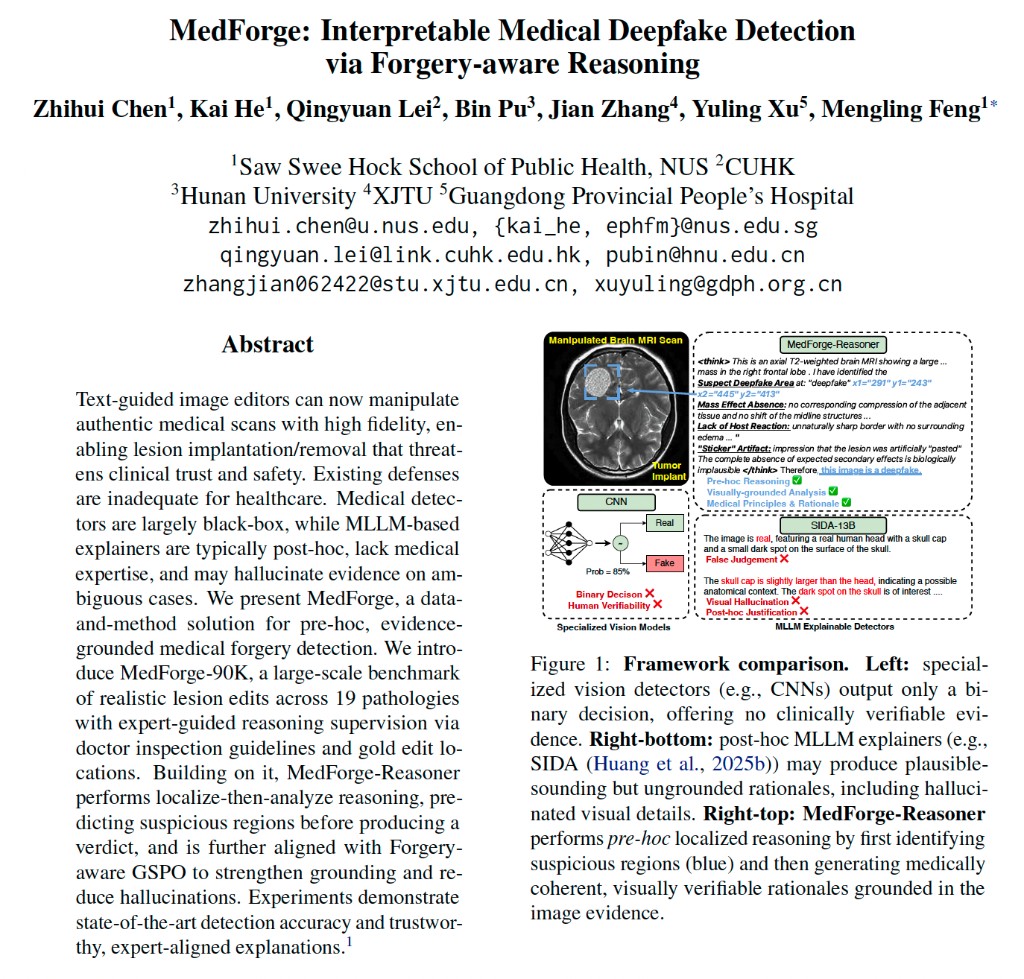
MedForge: Interpretable Medical Deepfake Detection via Forgery-aware Reasoning
A data-and-model framework for trustworthy medical deepfake detection, built around evidence-grounded reasoning, forgery localization, and a public demo stack.
What is included
ACL 2026 main conference paper on interpretable medical forgery detection
MedForge-90K dataset: 30K real images, 30K lesion implant forgeries, and 30K lesion removal forgeries
MedForge-Reasoner: a Qwen3-VL based detector using a Localize-then-Analyze reasoning pipeline
Interactive demo for medical image deepfake detection and reasoning visualization
Motivation
Moves beyond black-box real/fake prediction to localized, evidence-grounded explanations
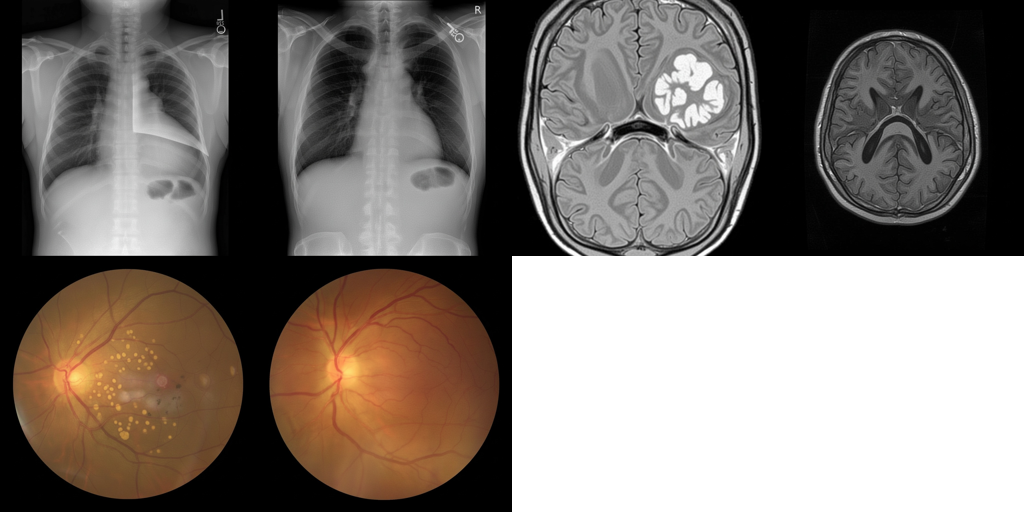
Targets realistic lesion implantation and removal risks in chest X-ray, brain MRI, and fundus images
Combines dataset, model, and demo into a single research artifact instead of a paper-only release
Public resources
Asset
Details
Paper
ACL 2026 Main Conference
Dataset
MedForge-90K, covering CT, MRI, and X-ray with 19 lesion types (50K+ Hugging Face downloads)
Med-Banana connects my RSI research to medical agents: the system uses its failed attempts to revise how it approaches the next edit. The recursive improvement happens in the prompt policy, guided by a learned verifier and refiner.
The Self-Improvement Loop
Edit: Generate a candidate from the source image and current prompt pair.
Verify: Diagnose failures in pathology, anatomy, instruction compliance, and imaging fidelity.
Refine: Use rejection reasons and failure history to revise both prompts, then retry from the original image.
Learn: Train the editor on successful edits and the verifier and refiner on trajectory-level feedback.
Med-Banana-80K: 50,635 successful and 37,822 failed attempts across three imaging modalities and 23 disease categories; 150K+ Hugging Face downloads.
Dataset Statistics
Modality
Task
Diseases
Success
Failed
Chest X-ray
Add
12
9,854
7,971
Chest X-ray
Remove
12
10,667
4,750
Brain MRI
Add
4
4,536
8,630
Brain MRI
Remove
4
4,355
6,949
Fundus
Add
7
18,505
3,162
Fundus
Remove
7
2,718
6,360
Total
23+
50,635
37,822
Med-Banana-80K samples
Open asset: Dataset, code, and paper are publicly available for medically grounded image editing research.
MiniMax Cowork Team Fellowship: Medical Foundation Model Development and Clinically Verifiable Agent Workflows
A compute-supported project from MiniMax, focused on turning long-context, multimodal, and Agent capabilities into medical foundation model development and clinically verifiable workflows.
Project focus
Medical foundation model development: long-context, multimodal, and Agent capabilities for healthcare workflows
Iterative data improvement: evaluation findings are converted into targeted cases, feedback signals, and training data
Clinically verifiable Agent workflows: outputs are structured around traceable evidence, review checkpoints, and reproducible decision paths
Grant support
Program
MiniMax Cowork Team Fellowship
Support
USD 4,500 compute grant
Direction
Medical foundation model development and clinically verifiable Agent workflows
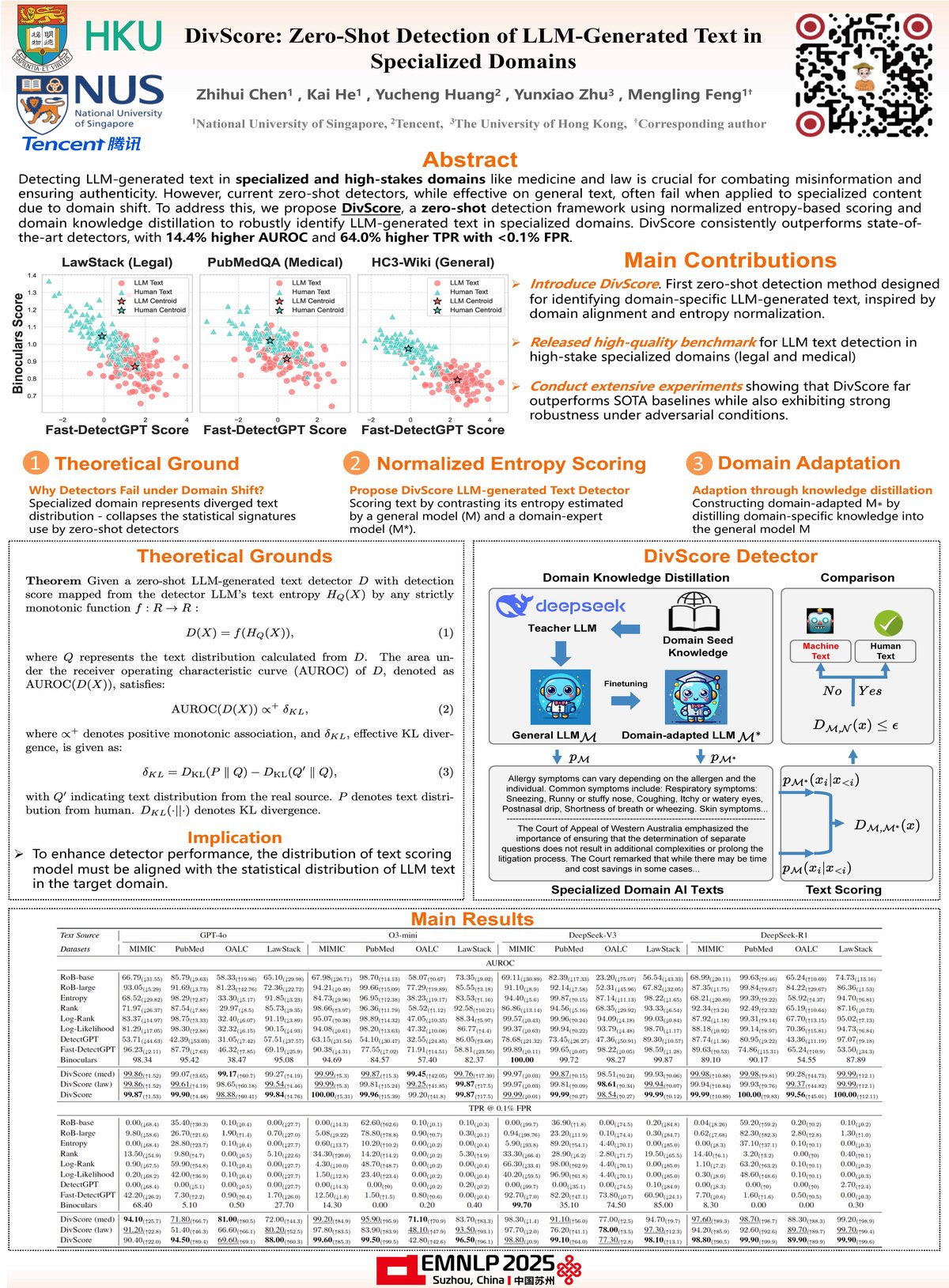
DivScore: Zero-Shot LLM Detection in Specialized Domains (EMNLP 2025)
A zero-shot detection framework for identifying LLM-generated text in specialized domains like medicine and law, using normalized entropy-based scoring and domain knowledge distillation.
Key Innovations
Zero-shot detection: No training data required for new domains
Normalized entropy scoring: Robust metric for specialized text
Legal ASR Service: Whisper Large-v2 Deployment with Docker + FastAPI
A GPU-accelerated legal-domain speech-to-text service delivered for Haiwen & Partners LLP (HK), built on Whisper Large-v2 and packaged as a production serving stack.
Serving stack
Whisper Large-v2 with GPU acceleration for legal-domain audio
Docker + FastAPI serving pipeline for reproducible deployment
7.8% average WER on the delivered legal transcription workload
Quant Trading Agent: Autonomous LangChain Agent for HK Equities
An autonomous trading agent built at AQUMON on a LangChain architecture, orchestrating market analysis, signal generation, decision-making, and execution monitoring into one end-to-end pipeline for programmatic Hong Kong equity trading.
What it does
LangChain orchestration connecting market understanding, signal generation, strategy decision, and execution monitoring
Futu OpenAPI integration for real-time market-data streaming and automated order execution
Strategy validation loop to speed up iteration and deployment of programmatic strategies
Motivation
Demonstrates agent orchestration and tool-calling against a real, latency-sensitive external API
End-to-end loop from perception to action, the same shape as agentic post-training environments